RocketFish RF-GPS31104 Manual de usuario

Busca en linea o descarga Manual de usuario para Auriculares RocketFish RF-GPS31104. Rocketfish RF-GPS31104 User's Manual Manual de usuario

  • Descarga
  • Añadir a mis manuales
  • Imprimir
  • Pagina
    / 2
  • Tabla de contenidos
  • MARCADORES
  • Valorado. / 5. Basado en revisión del cliente
Vista de pagina 0
Congratulations on your purchase of the RF-GPS31104 wireless headset.
This headset represents the state of the art in wireless headset design and
is designed for reliable and trouble-free performance.
Package contents
• Wirelessheadset • Charger • QuickSetupGuide
Product features
Charging the battery
Peel othe protective plastic lm on the front of the headset, then charge
the headset before using.
• ConnectthesmallerendofthemicroUSBcable(included)tothe
opening on the end of the headset. To connect the cable to a power
source,eitherconnectthelargerendofthecabletoaUSBporton
your computer, or to the included wall adapter, which you then plug
into a wall outlet. If you charge with your computer, make sure the
computerispoweredon.Whilethebatteryischarging,theindicator
lightsred.Whenthebatteryisfullycharged,theindicatorlights
yellow-green.
Note: ChargetheheadsetwithattachedUSBcableandprovidedwall
charger only.
RF-GPS31104
Turning the headset on and o
1 To turn on the headset, press and hold the power button for about
two seconds. The headset beeps and the indicator blinks yellow-green.
2 To turn o the headset, press and hold the power button for about
four seconds. The headset beeps and the indicator briey lights red.
“Pairing” Your headset
YournewRocketfishBluetoothwirelessheadsetneedstobepairedtoyourPS3
TurnyourPS3oonthebackforabout10secondsandthenbackon.
PoweronyourPS3consolewiththetouchpowerbuttononthefrontof
thePS3.
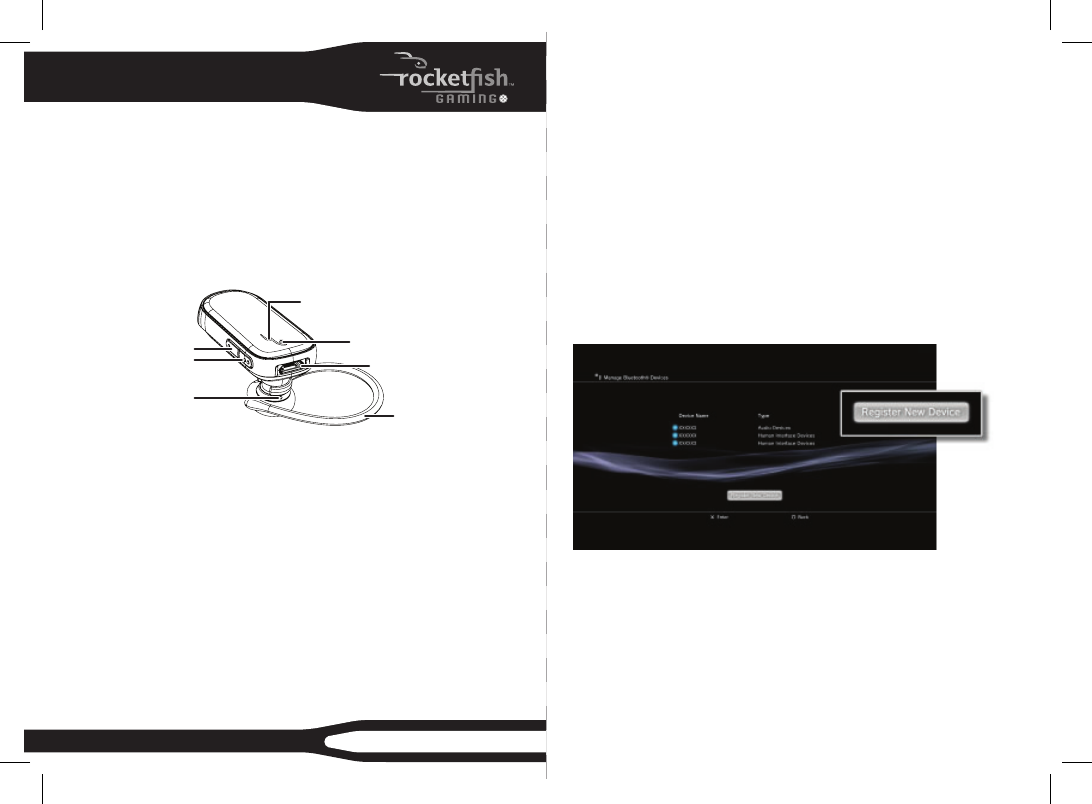
Find the Settings menu and press X on AccessorySettings.
Press X on the icon labeled: RegisterBluetooth®Device.
ScrolldownandpressX on the icon labeled ManageBluetoothDevices.
SelectYestoregisteranewdevice(ifthisisthersttimeregisteringa
Bluetoothdevice)thenpressX on StartScanning.
NowprepareyourRocketshBluetoothwirelessheadsettobepairedwith
thePS3byholdingdownthePower/Send/End button(theentiretop
area)ontheRocketshBluetoothwirelessheadsetforabout8seconds.
The LED on the device will start ashing a continuous green.
Oncescaniscomplete,thePS3willrecognizeallBluetoothdeviceswithin
QUICK SETUP GUIDE
Wireless Headset
Power/Send/Endbutton
Indicator light
Charger connector
Volume down
Volume up
Earpiece
Ear loop
Vista de pagina 0
1 2

Indice de contenidos

Pagina 1 - Wireless Headset

Congratulations on your purchase of the RF-GPS31104 wireless headset. This headset represents the state of the art in wireless headset design and is d

Pagina 2 - 90-day limited warranty

range.ThisdevicewillberecognizedasRF-QX3.Whenpromptedforapasskey,enter0000(fourzeros)asthePassKeyandpress X on OK.You should the

Comentarios a estos manuales

Sin comentarios